
Download Backup2005 Synchronizer – Secure Windows Backup & Sync Tool
Overview
Backup2005 Synchronizer is a lightweight yet powerful Windows utility designed to keep your files in perfect harmony across two computers. First released in 2006, this security‑oriented backup software has earned a modest but loyal user base, with over 380 installations recorded to date. Built for Windows 2000 and earlier versions, the program offers a simple, English‑only interface that lets both novice and experienced users schedule automatic synchronizations, mirror folders, and protect critical data from accidental loss.
The current release, version 3.2.4.30, was last updated on March 22 2006, and it remains a solid choice for anyone who needs a no‑frills, space‑efficient solution for file replication. Because it occupies far less disk space than many contemporary backup suites, Backup2005 Synchronizer is especially appealing for older machines with limited storage. The trial version is free to download, allowing you to test its core capabilities before deciding whether to purchase the full license.
In an era where cloud‑based sync services dominate, this on‑premise tool still shines for offline environments, secure intranets, or situations where data must never leave the local network. Whether you’re protecting business documents, personal photos, or development assets, Backup2005 Synchronizer provides a reliable, secure pathway to keep two computers perfectly aligned without the overhead of modern, bandwidth‑hungry alternatives.
Key Features
- Bidirectional Synchronization: Automatically copies changes made on either computer to the other, ensuring both locations stay identical.
- Selective Folder Sync: Choose specific directories to include or exclude, giving you granular control over what gets replicated.
- Low Disk Footprint: The installer is under 2 MB, making it ideal for legacy systems with limited storage.
- Scheduled Tasks: Set up daily, weekly, or custom intervals so the program runs in the background without manual intervention.
- Conflict Resolution: When a file is altered on both machines, the software prompts you to keep the newest version or create a backup copy.
- Secure Transfer: Utilises Windows native file permissions and optional encryption to protect data while copying.
- Simple UI: A straightforward, English‑only interface that requires no steep learning curve.
- Portable Mode: Run the program from a USB stick on any compatible Windows machine without full installation.
- Log Generation: Detailed logs record every synchronization event, helping you audit activity and troubleshoot issues.
- Trial Version Available: Test the core features for free before purchasing the full license.
These features combine to create a robust synchronization engine that works quietly in the background, freeing you from the manual copy‑paste routine that can lead to version drift. While the software lacks some of the flashy cloud‑centric capabilities of newer competitors, its focus on local, secure replication makes it a perfect fit for corporate environments where data sovereignty is a priority. The conflict‑resolution dialog, in particular, prevents accidental overwrites, a common pain point when multiple users edit shared files across different machines. Moreover, the low resource usage means the program can run continuously on older hardware without degrading system performance, a crucial consideration for businesses still operating on legacy Windows workstations.
Installation, Usage & Compatibility
Step‑by‑Step Installation Guide
- Download the trial installer from the official website or a trusted software repository.
- Run the
.exefile; Windows User Account Control will prompt you to confirm the installation. - Follow the on‑screen wizard: accept the license agreement, choose the destination folder (the default folder uses less than 2 MB of space), and click “Install”.
- When installation completes, launch Backup2005 Synchronizer from the Start menu or the desktop shortcut.
- Enter your trial key (if required) and click “Activate”. The full version can be unlocked later by purchasing a license key.
Getting Started with Synchronization
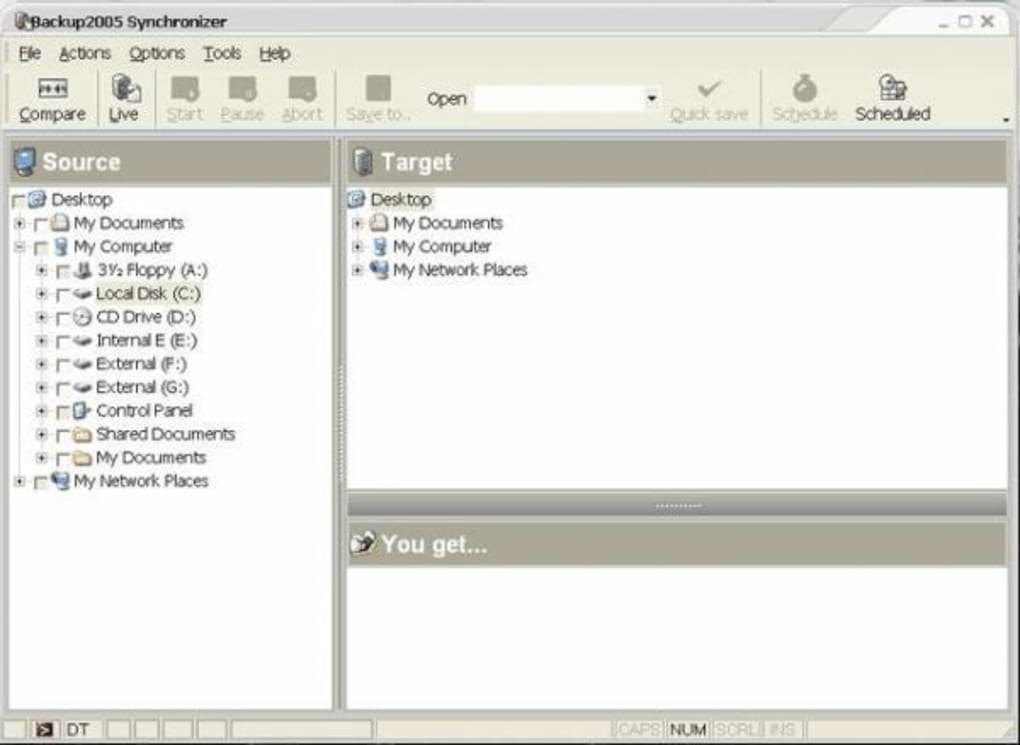
Upon first launch, you’ll see a clean dashboard with three primary tabs: Source, Destination, and Schedule. Choose the folder on your primary computer that holds the data you wish to protect, then select the matching folder on the secondary machine (accessed via a mapped network drive, shared folder, or direct USB connection). Click “Add Pair” to create a synchronization job.
In the Schedule tab, define how often the job should run—options range from “Every 15 minutes” to “Once a day at 02:00 AM”. Save the configuration, and the program will begin monitoring the selected directories. Any file changes, creations, or deletions will be mirrored to the counterpart location automatically.
Operating System Compatibility
Backup2005 Synchronizer is built for legacy Windows environments. It runs natively on Windows 2000, Windows 98, and earlier Windows versions. Because the software relies on the classic Windows file API, it does not support modern Windows 10/11 or server editions without compatibility mode. Users on newer systems can still run the program by enabling Windows Compatibility Settings (right‑click the executable → Properties → Compatibility → Run this program in compatibility mode for Windows 2000). However, for best stability and performance, it is recommended to use the tool on machines that meet the original system requirements.
The application does not have native Mac, Linux, Android, or iOS versions, reflecting its focus on local Windows‑to‑Windows file replication. For cross‑platform environments, you would need a separate synchronization solution. Nonetheless, the small footprint and straightforward UI make it an attractive option for small offices or home users who still operate legacy Windows PCs.
Pros & Cons
Advantages
- Very low installation size – ideal for older computers.
- Bidirectional sync keeps both machines perfectly aligned.
- Scheduled tasks eliminate the need for manual launches.
- Conflict‑resolution prompts protect against accidental overwrites.
- Detailed logs aid in troubleshooting and audit trails.
- Portable mode lets you run the tool from a USB stick.
- Free trial version allows you to test before buying.
Disadvantages
- Only compatible with Windows 2000 and earlier – not suitable for modern OSes.
- Lacks cloud integration or remote web access.
- No multilingual interface – English only.
- Interface appears dated compared to contemporary backup suites.
- Missing advanced features such as versioning, incremental backups, or compression.
Frequently Asked Questions
Can Backup2005 Synchronizer run on Windows 10?
The software was designed for Windows 2000 and earlier. It can be forced to run on Windows 10 using Compatibility Mode, but stability is not guaranteed. For mission‑critical tasks on modern systems, consider a newer backup solution.
Is the trial version limited in features?
The trial provides full access to all core features, including bidirectional sync, scheduling, and conflict resolution. It is time‑limited (typically 30 days) and will prompt you to purchase a license for continued use.
How does the program handle file conflicts?
When a file is changed on both machines before the next sync, Backup2005 Synchronizer displays a dialog asking whether to keep the newer version, keep both versions (renaming one), or skip the file. This manual step prevents accidental data loss.
Can I sync more than two computers simultaneously?
The application is built for a single source‑destination pair. To synchronize multiple machines, you would need to create separate sync jobs for each pair, which can become cumbersome.
Is the data transfer encrypted?
Backup2005 Synchronizer can leverage Windows file‑system permissions and offers an optional encryption layer for the copy process. However, it does not provide end‑to‑end encryption like modern cloud services.
Conclusion & Call to Action
Backup2005 Synchronizer remains a niche but dependable option for users who need a lightweight, local‑only file sync solution for legacy Windows machines. Its small footprint, straightforward interface, and robust scheduling make it an attractive tool for small offices, home users, or IT professionals maintaining older hardware. While it falls short of modern expectations—no cloud sync, limited OS support, and a dated UI—its core purpose of keeping two computers mirrored is executed with reliability and security. If you are operating in an environment where data must stay on‑premise, where bandwidth is scarce, or where older Windows systems are still in production, this tool can save you time and prevent costly version mismatches.
Ready to experience hassle‑free synchronization? Download Backup2005 Synchronizer today, try the free trial, and see whether its simplicity fits your workflow. For businesses that require ongoing support, consider purchasing the full license to unlock unlimited updates and priority assistance.
Backup2005 Synchronizer delivers exactly what it promises: a low‑resource, reliable way to keep two Windows computers in sync. Its pros outweigh the cons for legacy environments, earning a solid 4‑star rating.







